Forum Moderators: DixonJones

Message Too Old, No Replies

Microsoft Clarity Analytics Now Generally Available


engine

3:45 pm on Oct 29, 2020 (gmt 0)

WebmasterWorld Administrator 10+ Year Member Top Contributors Of The Month


Microsoft has released Microsoft Clarity now generally available.
Clarity is a tool to help webmasters and marketers understand user behaviour with session playback, heatmaps, insights to discover site problems.


Replay user sessions and explore heatmaps to make your website work better for your customers and your business, for free.
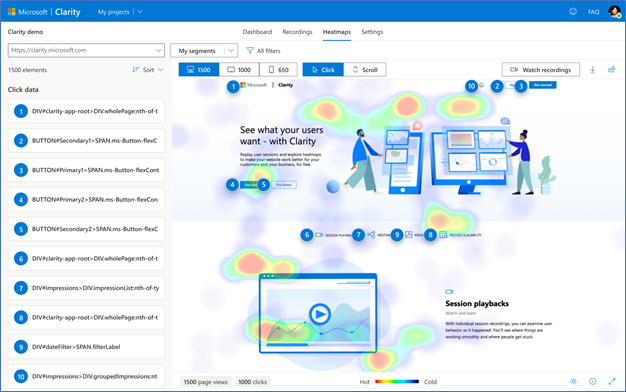

[blogs.bing.com...]
https://blogs.bing.com/BingBlogs/media/WebmasterBlog/Clarity-heatmaps.png

Brett_Tabke

7:39 pm on Oct 30, 2020 (gmt 0)

WebmasterWorld Administrator 10+ Year Member Top Contributors Of The Month Best Post Of The Month


This is a big deal. Heat maps are tough to do!

christianz

10:56 pm on Nov 3, 2020 (gmt 0)

WebmasterWorld Senior Member 5+ Year Member Top Contributors Of The Month


Unfortunately it fails due to two things:

1.) It REQUIRES to use the evil Google Analytics to use Clarity, which is insane, actually.
2.) It crashes with error when you do allow it access to your evil Google Analytics account.

Fail.

robzilla

11:31 pm on Nov 3, 2020 (gmt 0)

WebmasterWorld Senior Member 10+ Year Member Top Contributors Of The Month


1.) It REQUIRES to use the evil Google Analytics to use Clarity, which is insane, actually.

This is false. Analytics integration is available, but it's entirely optional.

2.) It crashes with error when you do allow it access to your evil Google Analytics account.

A "crash" is a bit of an overstatement, but there does seem to be a problem with the link:

"There was an issue trying to link Google Analytics. Please try again later."

christianz

12:02 am on Nov 4, 2020 (gmt 0)

WebmasterWorld Senior Member 5+ Year Member Top Contributors Of The Month


1.) Not false. There is no way to get past "Setup" phase unless you link to analytics and allow them to take your data (nothing is for free nowadays, right?).

2.) Not overstatement. It is internal error message that completely blocks ability to set up account and makes the entire application unusable for new users. How is that an overstatement for you?

robzilla

7:36 am on Nov 4, 2020 (gmt 0)

WebmasterWorld Senior Member 10+ Year Member Top Contributors Of The Month


1.) Not false. There is no way to get past "Setup" phase unless you link to analytics and allow them to take your data (nothing is for free nowadays, right?).

No, as soon as you add the tracking code to your pages, you're done. However, as noted, it may take up to two hours before you start seeing data, and until then you'll remain in the setup phase.

2.) Not overstatement. It is internal error message that completely blocks ability to set up account and makes the entire application unusable for new users. How is that an overstatement for you?

Linking a site from the connected Analytics account currently does not work, but the Clarity app works just fine without it. I added the tracking code last night and am browsing the recordings and heatmaps now.

ronin

11:18 am on Nov 4, 2020 (gmt 0)

WebmasterWorld Senior Member 10+ Year Member Top Contributors Of The Month


Heat maps are tough to do!


This is what Microsoft Clarity Analytics is up against.

Here's a satisfyingly detailed round-up (no affiliation) of Website Heatmap Software, up-to-date for 2020 Q4:

Top 13 Best Heatmap Software Tools for Websites (2020)
https://crm.org/news/best-heatmap-software

Suriya

10:10 am on Nov 10, 2020 (gmt 0)

5+ Year Member


Clarity's Dashboard looks Great! It provides many insights like sessions, Pages per session, Dead clicks, Popular pages, Users Device & more.

Recordings provide Information when the user clicks

The only con is Recording screen size can be enlarged still more!